- Home Page /
- Electronics /
- Computer Accessories /
- Computer Accessories & Peripherals /
- Computer Cable Adapters /
- DVI-HDMI Adapters /
- DTECH HDMI Dummy Plug 4K Display Emulator Com...
0 ratings






Item #:
20904888
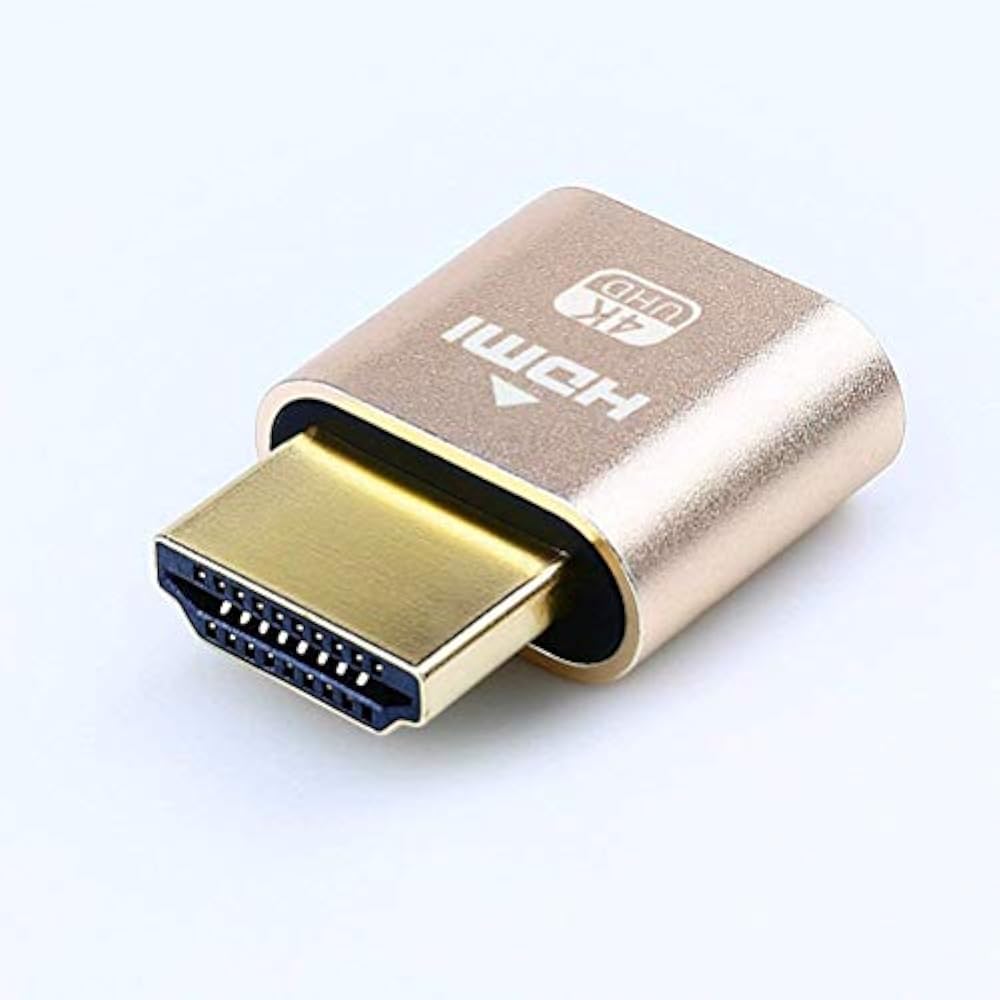
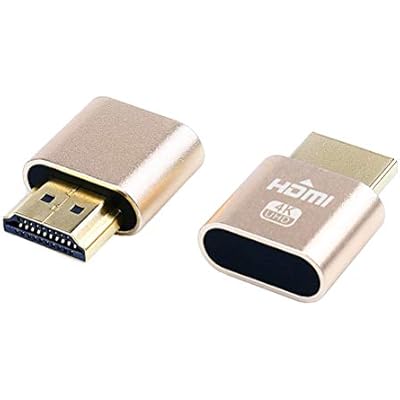
DTECH HDMI Dummy Plug 4K Display Emulator Compatible with Windows Mac OSX Linux Support 4kx2k 2160P 1080p for Computer Desktop (fit-Headless, 2 Pack)
Item #:
20904888
€ 13
Price Details
Excluding Shipping & Custom charges ( Shipping and custom charges will be calculated on checkout )
*All items will import from US
0 ratings
Write a review
In stock
 Imported from USA store
QTY:
Order now and get it around Wednesday, June 24
Secured transaction
Ubuy works hard to protect your security and privacy. Our advanced payment security system ensures confidentiality by encrypting your information during transmission using AES (Advanced Encryption Standards) and SSL (Secure Socket Layer) protocols. Your payment details are 100% secure as we do not share your payment details with third party sellers.
Our Top Logistics Partners


DTECH compact headless ghost HDMI adapter is a life-saver for you to add a virtual monitor to a computer.

Buy Now Pay Later

Fast
Shipping

Free
Return*

Secure Packaging

100% Original Products

PCI DSS Compliance

ISO 27001 Certified


Note: Step Down Voltage Transformer required for using electronics products of US store (110-120). Recommended power converters Buy Now.


What Stands Out
4K Resolution
Transmits stunning 4K resolution at 2160P, providing an exceptional visual experience, ideal for users needing high-definition output for graphics-intensive applications or gaming.
Universal Compatibility
Compatible with Windows, Mac, and Linux systems, ensuring seamless integration across various platforms for users without the hassle of driver installations.
Headless Operation
Designed for headless setups, this plug allows computers to run without a display, useful for servers or remote access setups, enhancing productivity and system performance.
Product Details
- 2 pack HDMI dummy plug enables GPU for high resolution tasks and GPGPU operations
- Emulates 4K 60hz 4096x2160 display for headless computer operation
- Plug-and-play on Windows, MAC, and Linux with no need for drivers or external power
- Gold plated dongle ensures stable digital signal for game-streaming and VR
- Must-have for server farms, SOHO servers, and remote-deployed headless PCs
- Compatible with Windows 11 10 8.1 8 7 XP, MAC OSX, Linux, etc.
| Compatible Devices | Computer |
| Specific Uses For Product | computer, laptop |
| Connector Type | HDMI |
| Number of Ports | 1 |
| Input Voltage | 5 Volts |
| Power Plug Type | Type A - 2 pin (North American) |
| Color | gold |
| Finish | Gold,Hdmi |
| Item Weight | 18.14 g |
| Package Quantity | 1 |
| Unit Count | 2 Count |
| Number of Items | 2 |
| Brand | DTECH |
| Model Number | T0667-2 |
| UPC | 714131650248 |
| Manufacturer | Guangzhou DTECH Electronics Technology Co.,Ltd |
| Mfr Part Number | 4348434872 |
Who Should Buy?

-
Remote Desktop Users
Ideal for users utilizing remote desktop applications needing a display output without a physical monitor attached.
-
Headless Servers
Perfect for headless servers requiring a dummy display output for graphic processing or server management tasks.
-
Software Testing
Beneficial for developers testing software that requires a graphics interface without using an actual display device.

-
Casual Gamers
Not suitable for gamers who require actual display output for an enhanced gaming experience and graphics performance.
-
Visual Content Creators
Content creators may find this product inadequate as it lacks the true display capabilities needed for accurate visual editing.
-
Heavy Multitaskers
Users needing multiple active monitors for multitasking may not benefit from a single dummy plug solution.
Product Description
Have any Query? Chat with us
Customer Questions & Answers
-
Question:
What is the DTech HDMI Dummy Plug used for?
Answer: The DTech HDMI Dummy Plug serves as a display emulator, allowing you to run headless systems without a physical monitor. It's particularly useful for servers and computers that need to function without a display, ensuring that the graphics card remains active. This setup is beneficial in environments where remote access or automation tasks are performed, such as programming or server management. -
Question:
Is the DTech HDMI Dummy Plug compatible with Mac, Windows, and Linux?
Answer: Yes, the DTech HDMI Dummy Plug is designed to be compatible across multiple operating systems, including Windows, Mac, and Linux. This versatility allows users from different platforms to benefit from its functionality. Whether you're a developer working on a Mac or a gamer using Windows, this plug provides a seamless solution to keep your system running without needing a display. -
Question:
What resolutions does the DTech HDMI Dummy Plug support?
Answer: The DTech HDMI Dummy Plug supports resolutions up to 4K (3840 x 2160) and 1080p (1920 x 1080). This capability makes it suitable for high-performance tasks that require high-resolution displays. For instance, if you're involved in graphical work or gaming, this plug ensures your graphics card is actively rendering as it would with a monitor connected. -
Question:
Can the DTech HDMI Dummy Plug be used for gaming?
Answer: Absolutely! The DTech HDMI Dummy Plug can enhance your gaming experience by enabling discrete graphics cards to function optimally without a monitor. This is especially useful for headless setups, like gaming servers. By utilizing the adapter, you can ensure that your system processes games effectively, collecting data or running server-side tasks in the background while you game on another device. -
Question:
How do I install the DTech HDMI Dummy Plug?
Answer: Installing the DTech HDMI Dummy Plug is quite straightforward. Simply plug the device into an available HDMI port on your computer's graphics card. Once inserted, the computer will detect it as a connected display, allowing you to configure settings as necessary through your operating system. This simple process makes it a convenient option for users looking to manage headless systems. -
Question:
Is it possible to use multiple DTech HDMI Dummy Plugs simultaneously?
Answer: Yes, you can use multiple DTech HDMI Dummy Plugs at once, depending on the number of HDMI ports available on your graphics card. This setup is ideal for developers or users who need to run several virtual machines, as each dummy plug can simulate a separate display. Hence, you can control multiple headless environments seamlessly on a single system. -
Question:
Do I need to adjust any settings when using the DTech HDMI Dummy Plug?
Answer: Typically, no special settings are required when using the DTech HDMI Dummy Plug, as most systems will automatically recognize it as an active display. However, if you face issues like resolution settings or display detection, you may need to adjust graphical settings through your operating system's display settings to optimize performance according to your needs. -
Question:
Can I use the DTech HDMI Dummy Plug with video surveillance systems?
Answer: Yes, the DTech HDMI Dummy Plug is great for video surveillance systems that require headless monitor setups. It allows you to keep the video GPU active and functioning, which is crucial for systems that need to process real-time data without the distraction of a connected monitor. This is particularly beneficial in camera and recording systems, ensuring ongoing operation. -
Question:
What is included in the DTech HDMI Dummy Plug package?
Answer: The DTech HDMI Dummy Plug package typically includes two dummy plugs, designed to simulate connected displays. This allows users to manage multiple systems or a headless configuration easily. Each plug is compact and designed for user-friendly installation, making it ideal for both personal and professional use in various computing environments. -
Question:
Where can I buy the DTech HDMI Dummy Plug?
Answer: You can buy the DTech HDMI Dummy Plug from Ubuy in Belgium. Ubuy offers a reliable platform to purchase this versatile display emulator, often with multiple shipping options and convenient payment methods. It's a great place to find the product to optimize your headless computing needs.
DTECH DVI-HDMI Adapters T0667-2 Editorial Review
The DTech HDMI Dummy Plug 4K Display Emulator has garnered a generally favorable reception from users who utilize it in headless computing scenarios. Many customers across various platforms including Windows, Mac, and Linux praise its performance in simulating a monitor connection, thereby enhancing the functionality of remote desktop applications and allowing for smooth operation of their systems without the need for an actual display. Users have reported significant improvements in managing their computers, particularly in settings where a physical monitor is impractical. For example, individuals running home servers, Plex setups, and even Raspberry Pi systems report that the dummy plug effectively tricks their machines into believing a monitor is connected, overcoming issues related to low resolution and sluggish performance typically experienced without a monitor. However, not all users have had a positive experience. One user faced challenges when attempting to connect to a Windows 11 machine, indicating that their remote desktop experience was hindered by the emulator, demonstrating that performance can vary based on specific configurations and remote desktop applications. On the whole, the DTech HDMI Dummy Plug stands out for its reliability and ease of use, making it a valuable tool for remote management in headless systems. **
Customer Reviews & Ratings
148 customers ratings
-
5 Star
68%
-
4 Star
14%
-
3 Star
5%
-
2 Star
2%
-
1 Star
11%
Review this product
Share your thoughts with other customers
Pros
- Effectively simulates monitor connection for remote access.
- Enhances performance of remote desktop applications on various systems.
- Users report long-term reliability and functionality.
- Simple setup and operation.
Cons
- The outer metal casing may be prone to damage if not securely attached.
Product Price History
Important information
- Limitations : For products shipped internationally, please note that any manufacturer warranty may not be valid; manufacturer service options may not be available; product manuals, instructions, and safety warnings may not be in destination country languages; the products (and accompanying materials) may not be designed in accordance with destination country standards, specifications, and labeling requirements; and the products may not conform to destination country voltage and other electrical standards (requiring use of an adapter or converter if appropriate). The recipient is responsible for assuring that the product can be lawfully imported to the destination country. When ordering from Ubuy or its affiliates, the recipient is the importer of record and must comply with all laws and regulations of the destination country.
- Not all the products listed on Ubuy are for sale, as Ubuy is a global search engine. Products are subject to export/trade regulations.
€ 13
Order now and get it around Wednesday, June 24
This item is not restrict in my country.(Please click on above link if this item is not restrict in your country, So our team will review and allow.)
QTY:
Secured transaction
Ubuy works hard to protect your security and privacy. Our advanced payment security system ensures confidentiality by encrypting your information during transmission using AES (Advanced Encryption Standards) and SSL (Secure Socket Layer) protocols. Your payment details are 100% secure as we do not share your payment details with third party sellers.
Our Top Logistics Partners
Fastest cross-border delivery
Features & Benefits
- Add a virtual monitor to your computer with the DTECH compact headless ghost HDMI adapter.
- Enables GPU acceleration for tasks like remote desktop, cryptocurrency mining, rendering, and simulations.
- Plug-and-play on Windows, MAC OS, and Linux; no driver or external power needed.
- Gold plated HDMI dummy dongle ensures stable digital signal.
- Ideal for game-streaming, VR, and using Mac Mini server with screen sharing.
- A must-have for server farms, home servers, and remote-deployed headless PCs.