- Home Page /
- Electronics /
- Computer Accessories /
- Computer Accessories & Peripherals /
- Input Devices /
- Graphics Tablets /
- Wacom Color Manager EODIS3-DCWA
0 ratings

Item #:
3220441
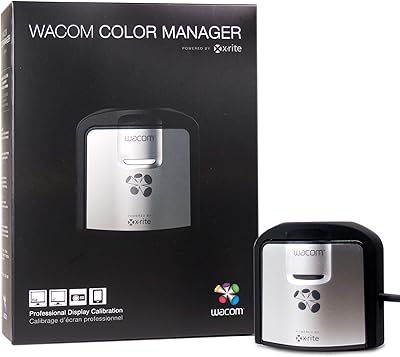
Wacom Color Manager EODIS3-DCWA
Item #:
3220441
€ 353
Price Details
Excluding Shipping & Custom charges ( Shipping and custom charges will be calculated on checkout )
*All items will import from US
0 ratings
Write a review
In stock
 Imported from USA store
QTY:
Order now and get it around Wednesday, June 24
Secured transaction
Ubuy works hard to protect your security and privacy. Our advanced payment security system ensures confidentiality by encrypting your information during transmission using AES (Advanced Encryption Standards) and SSL (Secure Socket Layer) protocols. Your payment details are 100% secure as we do not share your payment details with third party sellers.
Our Top Logistics Partners


Eliminate guesswork, create a color safe environment and attain color accuracy on all displays and final outputs with the ultimate color management solution for artists, photographers and designers.

Buy Now Pay Later

Fast
Shipping

Free
Return*

Secure Packaging

100% Original Products

PCI DSS Compliance

ISO 27001 Certified


Note: Step Down Voltage Transformer required for using electronics products of US store (110-120). Recommended power converters Buy Now.


What Stands Out
Accurate Color Calibration
The Wacom Color Manager provides precise color calibration ensuring true-to-life colors, enhancing professional workflows in digital art and design.
User-Friendly Interface
Designed for ease of use, the intuitive interface allows quick adjustments, making color management accessible for both beginners and seasoned professionals.
Enhanced Compatibility
Compatible with various Wacom devices, this color manager seamlessly integrates into existing workflows, improving efficiency and productivity for creative professionals.
Product Details
- Industry leading i1Profiler software for calibrating and profiling laptop and desktop monitors
- Compatible with X-Rite Color TRUE mobile app for calibrating mobile devices
- Infinite control of white point, luminance, contrast ratio, gamma, and more
- Supports multiple monitor and workgroup profiling
- Intelligent Iterative Profiling for increased accuracy
- Includes Wacom Calibrator hardware and custom Wacom Profiler software
| Item Weight | 0.6 lbs (270 grams) |
Who Should Buy?

-
Professional Designers
Perfect for graphic designers needing accurate color calibration for prints and digital media ensuring high-quality outputs.
-
Photographers
Ideal for photographers requiring precise color accuracy for photo editing to maintain true-to-life representations.
-
Artists
Great for digital artists who need reliable color consistency across devices, enhancing their creative work experience.

-
Casual Users
Not an essential tool for casual users who do not focus on color accuracy in their projects or hobbies.
-
Budget-Conscious
Offers high-end features that may exceed the budget of users seeking basic color calibration without advanced capabilities.
-
Gaming Enthusiasts
Gamers do not typically require professional-level color calibration, making this product unnecessary for gaming-related tasks.
Product Description
Wacom Color Manager EODIS3-DCWA
Have any Query? Chat with us
Customer Questions & Answers
-
Question:
What is the primary function of the Wacom Color Manager EODIS3-DCWA?
Answer: The Wacom Color Manager EODIS3-DCWA is designed to ensure accurate color calibration for your Wacom display devices. This tool enables users to achieve consistent and true-to-life color representation, which is crucial for professionals in graphic design, photography, and video production. For instance, if you're working on a color-sensitive project like photo editing, using this color manager can convert your visual output to match industry standards, ensuring your work appears as intended across different screens. -
Question:
How does the Wacom Color Manager improve color accuracy?
Answer: The Wacom Color Manager uses advanced calibration technology to adjust and enhance the color performance of your display. It creates a color profile tailored to your specific device, which corrects any color discrepancies. This is particularly beneficial for designers who need their digital creations to look the same on various devices. Additionally, it employs sophisticated algorithms to adjust brightness and contrast, giving you a vibrant and precise color experience across all your creative tasks. -
Question:
Is the Wacom Color Manager compatible with all Wacom displays?
Answer: Yes, the Wacom Color Manager EODIS3-DCWA is compatible with most Wacom display models, making it a versatile tool for users who own multiple devices. This compatibility allows creators to maintain a cohesive workflow without worrying about color variations affecting their projects. For example, if you switch between a Wacom Cintiq and a Wacom Cintiq Pro, using the Wacom Color Manager ensures that your colors remain consistent, streamlining the creative process. -
Question:
Can I use the Wacom Color Manager for print color accuracy?
Answer: Absolutely! The Wacom Color Manager is an essential tool for ensuring print color accuracy. By adjusting your display's color settings to match industry-standard print profiles, you can minimize discrepancies between what you see on-screen and the final printed output. This is crucial for designers and photographers who need to present authentic color representations in their printed materials, such as brochures or portfolios. -
Question:
What are the benefits of using the Wacom Color Manager for professional creatives?
Answer: Using the Wacom Color Manager provides several benefits for professional creatives, including improved color precision, enhanced workflow efficiency, and the ability to meet client expectations for color consistency. It allows users to focus on their creative work without worrying about color inaccuracies. For instance, if a graphic designer is creating branding materials, the ability to produce consistent colors across digital and print formats can greatly enhance the appeal and professionalism of the final product. -
Question:
Is it possible to adjust color settings manually with Wacom Color Manager?
Answer: Yes, the Wacom Color Manager allows manual adjustments to color settings, giving users greater control over their display's color profile. This flexibility is invaluable for professionals who have specific color requirements or prefer a certain aesthetic in their work. For example, an artist who enjoys a warmer color palette can fine-tune the settings to reflect their artistic vision more accurately, ensuring that their digital creations align with their personal style. -
Question:
What type of software does the Wacom Color Manager come with?
Answer: The Wacom Color Manager typically comes with its own calibration software that is user-friendly and intuitive. This software guides users through the setup process and helps manage color profiles. It is designed to simplify the calibration experience, allowing creatives to quickly adjust their display settings. For those who aren't tech-savvy, this software makes it easy to achieve precise color calibration without a steep learning curve. -
Question:
What is the design and build quality of the Wacom Color Manager?
Answer: The Wacom Color Manager EODIS3-DCWA boasts a sleek and modern design that complements Wacom's aesthetic. Its compact size and lightweight construction make it easy to handle and integrate into any workspace. The build quality is sturdy, ensuring durability during frequent use. This combination of design and functionality caters to busy professionals who need reliable equipment that also looks great in their creative environments. -
Question:
How often should I recalibrate my display using the Wacom Color Manager?
Answer: It is recommended to recalibrate your display using the Wacom Color Manager regularly, particularly before starting new projects or after changes in lighting conditions in your workspace. Frequent recalibration helps maintain color accuracy and can be crucial for ongoing projects where precision is key. For instance, if you are working on a large project spread over several weeks, calibrating your display monthly can ensure your color consistency remains intact. -
Question:
Where can I buy Wacom Color Manager EODIS3-DCWA, White?
Answer: You can purchase the Wacom Color Manager EODIS3-DCWA, White from Ubuy. Ubuy offers a comprehensive selection of Wacom products and provides a reliable shopping experience for customers in Belgium. By shopping through Ubuy, you can find competitive options and make informed purchases with confidence in your chosen products.
Wacom Graphics Tablets Editorial Review
The Wacom Color Manager EODIS3-DCWA is a powerful tool used to help calibrate the display of your Wacom Cintiq or Cintiq Pro line. It can measure up to 2000 nits and is certified to work with non-Wacom displays as well. The device accurately profiles colors on your monitor after calibration, resulting in Consistent and reliable color performance during your work. The Color Manager allows for accurate and fast calibration of displays, and a higher-grade software package is available for those who need advanced calibration features.
Customer Reviews & Ratings
1 customers ratings
-
5 Star
100%
-
4 Star
0%
-
3 Star
0%
-
2 Star
0%
-
1 Star
0%
Review this product
Share your thoughts with other customers
Pros
- Accurately measures up to 2000 nits
- Can work with non-Wacom displays
- Allows for accurate and fast calibration
- Higher-grade software package available for advanced calibration features
Product Price History
Important information
- Limitations : For products shipped internationally, please note that any manufacturer warranty may not be valid; manufacturer service options may not be available; product manuals, instructions, and safety warnings may not be in destination country languages; the products (and accompanying materials) may not be designed in accordance with destination country standards, specifications, and labeling requirements; and the products may not conform to destination country voltage and other electrical standards (requiring use of an adapter or converter if appropriate). The recipient is responsible for assuring that the product can be lawfully imported to the destination country. When ordering from Ubuy or its affiliates, the recipient is the importer of record and must comply with all laws and regulations of the destination country.
- Not all the products listed on Ubuy are for sale, as Ubuy is a global search engine. Products are subject to export/trade regulations.
€ 353
Order now and get it around Wednesday, June 24
This item is not restrict in my country.(Please click on above link if this item is not restrict in your country, So our team will review and allow.)
QTY:
Secured transaction
Ubuy works hard to protect your security and privacy. Our advanced payment security system ensures confidentiality by encrypting your information during transmission using AES (Advanced Encryption Standards) and SSL (Secure Socket Layer) protocols. Your payment details are 100% secure as we do not share your payment details with third party sellers.
Our Top Logistics Partners
Fastest cross-border delivery
Features & Benefits
- Wacom Color Manager helps in taking the complexity out of color management.
- It ensures that colors on displays, and in finished work reproduce exactly as intended.
- The Color Manager is compatible with most modern monitors and the Wacom Cintiq 27QHD Creative Pen Displays.
- Coupled with Cintiq and Color Manager maintains consistency across the entire workflow.
- Profiling modes and customizable settings provide flexibility and control to create unique patch sets.
- Wacom Color Manager includes X-Rite Color TRUE mobile app for calibrating and profiling all modern laptop and desktop monitor technologies.