- Home Page /
- Office Products /
- Office Electronics /
- Printers & Accessories /
- Computer Printers /
- Label Printers /
- ZEBRA ZD620t Thermal Transfer Desktop Printer...
0 ratings





Item #:
54355681
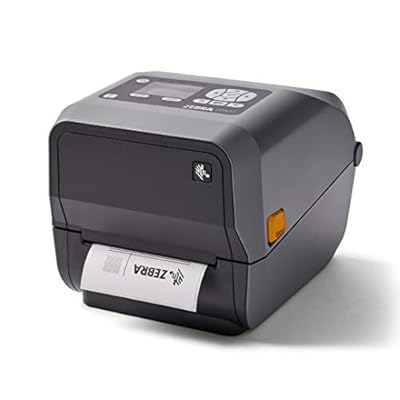
ZEBRA ZD620t Thermal Transfer Desktop Printer with LCD Screen 203 dpi Print Width 4 in WiFi Bluetooth USB Serial Ethernet ZD62142-T01L01EZ
Item #:
54355681
€ 773
Price Details
Excluding Shipping & Custom charges ( Shipping and custom charges will be calculated on checkout )
*All items will import from US
0 ratings
Write a review
In stock
 Imported from USA store
QTY:
Only 1 item left in stock.
Order now and get it around Wednesday, July 08
Secured transaction
Ubuy works hard to protect your security and privacy. Our advanced payment security system ensures confidentiality by encrypting your information during transmission using AES (Advanced Encryption Standards) and SSL (Secure Socket Layer) protocols. Your payment details are 100% secure as we do not share your payment details with third party sellers.
Our Top Logistics Partners


Buy Now Pay Later

Fast
Shipping

Free
Return*

Secure Packaging

100% Original Products

PCI DSS Compliance

ISO 27001 Certified


Note: Step Down Voltage Transformer required for using electronics products of US store (110-120). Recommended power converters Buy Now.


What Stands Out
High-Quality Printing
Delivers clear and sharp labels with 203 dpi resolution, ensuring detailed output for various labeling needs, suitable for both small businesses and large enterprises.
Versatile Connectivity
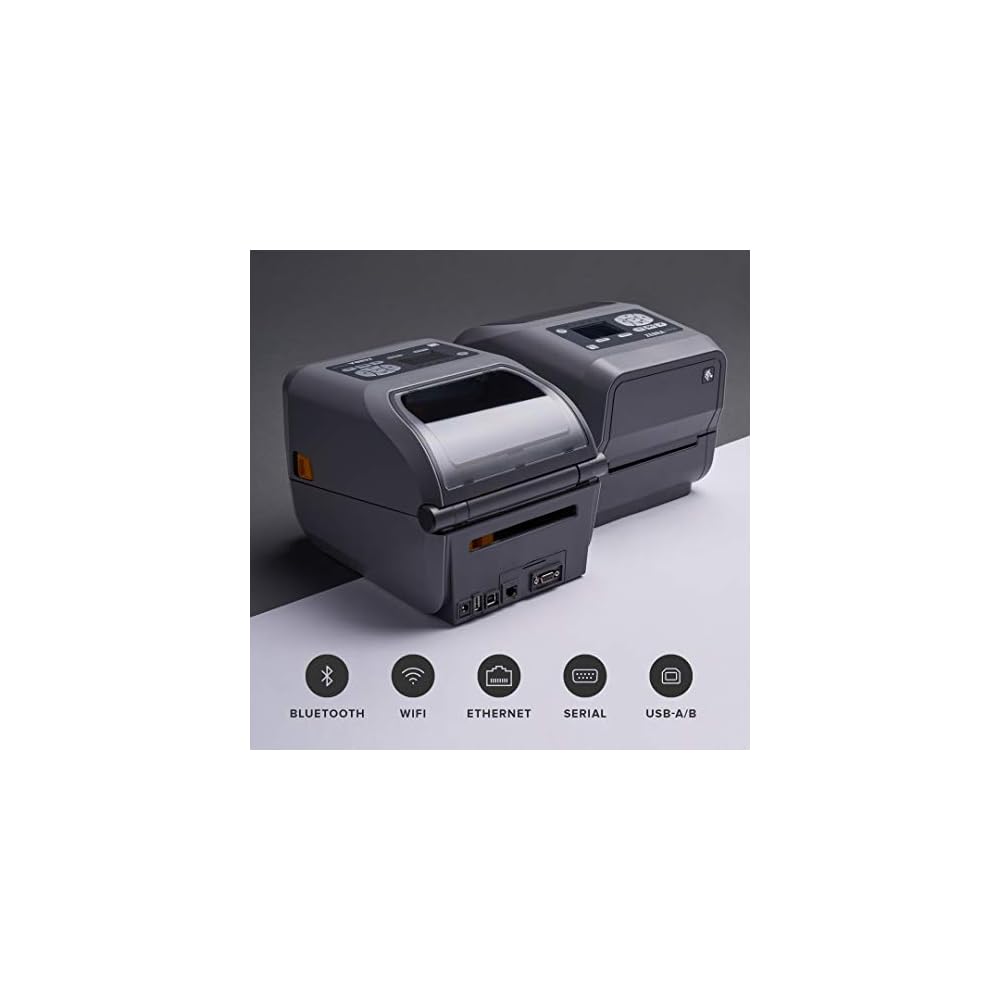
Equipped with WiFi, Bluetooth, USB, Serial, and Ethernet, allowing seamless integration into different workflows and environments, enhancing operational efficiency.
User-Friendly Interface
Features an LCD screen for easy navigation and monitoring, simplifying printer settings adjustments and providing real-time information, improving user experience.
Product Details
- Easy to use: Connects via Wifi, Bluetooth, Ethernet, Serial, USB and is compatible with media rolls that have a 1 in core, a max diameter of 5 in, and a max width of 4.25 in
- Thermal transfer technology: Requires the use of a thermal ribbon; can also print using Direct Thermal technology which requires the use of direct thermal media but no ribbon required
- Powerful: Fast print speeds, superior performance, and top print quality for address, shipping, mailing, file folder, barcode, and binder labels as well as name tags, wrist bands, and receipts
- Media handling: Compatible with field installable add ons (cutter, peeler, connectivity port adapters), max print speed of 8 in/sec, 203 dpi, and is Energy Star approved
- Link-OS: Simplified remote management tool to deploy large fleets of printers across multiple locations to maintain, secure and troubleshoot printers from anywhere, anytime
| Printer Type | Thermal |
| Other Special Features of the Product | Bluetooth,Ethernet |
| Printer Output Type | Monochrome |
| Item Weight | 9.7 Pounds (4.4 kg) |
| Controller Type | Button Control |
| Print media | Labels |
| Compatible Devices | PC |
| Ink Color | Black |
| Additional Printer Functions | Print Only |
| Control Method | Remote |
| Number of Trays | 1 |
| Resolution | 203 x 203 DPI |
| Display Type | LCD |
| Color | Gray |
| Printer Connectivity Type | Wifi, Bluetooth, Ethernet, Serial, USB |
| Hardware Interface | Bluetooth |
| Number of Ethernet Ports | 1 |
| Brand | Zebra Technologies |
| Model Name | ZD62142-T01L01EZ |
| Model Number | ZD62142-T01L01EZ |
| Model Series | ZD620 |
| Manufacturer | Zebra |
| Maximum Media Size | 4.25 x 5 inches (10.8 cm) |
| Maximum Sheet Capacity | 100 |
| Paper Size | 4.25 inches (10.8 cm) |
| Maximum Print Resolution Black and White | 203 dpi |
| Dual-sided printing | No |
| Duplex | Simplex |
| Maximum Copy Resolution Black and White | 203 dpi |
| Connectivity Technology | Wifi, Bluetooth, Ethernet, Serial, USB |
| Printing Technology | Thermal |
| Special Feature | Bluetooth,Ethernet |
| Printer Output | Monochrome |
Who Should Buy?

-
Retail Environments
Ideal for retail stores requiring reliable label printing for price tags, inventory, and shipping labels efficiently.
-
Healthcare Settings
Beneficial for hospitals and clinics needing durable labels for medication, patient wristbands, and barcoding systems.
-
Logistics Operations
Perfect for warehouses and shipping companies that require fast, high-quality label printing for shipping and tracking.

-
Home Use
Not suitable for casual home users who require infrequent printing of simpler documents or occasional labels.
-
Large Scale Production
May not meet the needs of high-volume production settings without additional features or larger industrial printers.
-
Budget-Conscious Buyers
Not ideal for users looking for inexpensive options, as this printer may be on the higher end of pricing.
Product Description
Have any Query? Chat with us
Customer Questions & Answers
-
Question:
What features does the ZEBRA ZD620t Thermal Transfer Desktop Printer offer?
Answer: The ZEBRA ZD620t Thermal Transfer Desktop Printer boasts an LCD screen, a print resolution of 203 dpi, and a 4-inch print width. It supports multiple connectivity options including WiFi, Bluetooth, USB, Serial, and Ethernet, making it very versatile. This wide range of features allows users to print labels seamlessly from various devices and networks, making it ideal for retail, warehousing, and healthcare environments. -
Question:
How do I set up the ZEBRA ZD620t Thermal Transfer Printer?
Answer: Setting up the ZEBRA ZD620t is straightforward. Start by connecting the printer to your power source and network—choose between WiFi, Bluetooth, or a wired connection via USB or Ethernet. Next, install the necessary drivers on your computer, ensuring compatibility with your operating system. Finally, load the thermal transfer ribbon and labels as per the manual’s guidance. This printer is designed for quick deployment, making it suitable for busy work environments. -
Question:
Can I use the ZEBRA ZD620t for high-volume printing?
Answer: Yes, the ZEBRA ZD620t is designed for high-volume printing tasks. With its robust thermal transfer technology, it can produce a large number of labels efficiently. This makes it perfect for businesses needing to print shipping labels or product tags on a daily basis. The printer's fast printing speeds and reliable performance ensure minimal downtime, allowing continuous workflow even during peak hours. -
Question:
Is the ZEBRA ZD620t printer compatible with label design software?
Answer: Absolutely! The ZEBRA ZD620t works seamlessly with various label design software, such as Bartender, ZebraDesigner, and NiceLabel. This compatibility allows users to create custom labels tailored to their specific needs. It's ideal for customizing shipping labels, barcode labels, or product tags, giving businesses the flexibility to reflect their branding or product information accurately. -
Question:
What types of labels can I print with the ZEBRA ZD620t?
Answer: The ZEBRA ZD620t can print a variety of labels, including shipping labels, barcode labels, and product tags. It is compatible with different materials such as paper and synthetic substrates designed for thermal transfer printing. This versatility makes the printer suitable for industries like logistics, retail, and healthcare, where different label types may be necessary for efficient operation. -
Question:
How can I troubleshoot common issues with the ZEBRA ZD620t printer?
Answer: Common issues with the ZEBRA ZD620t can include printing errors or connectivity problems. To troubleshoot, check the printer’s display for error messages, ensure the correct drivers are installed, and verify your label stock is loaded properly. For connectivity, ensure your network settings are correct if using WiFi or Bluetooth. Consulting the user manual can provide additional solutions tailored to specific issues, ensuring smooth operations. -
Question:
Does the ZEBRA ZD620t support mobile printing?
Answer: Yes, the ZEBRA ZD620t supports mobile printing through its Bluetooth and WiFi connectivity options. Users can easily connect their smartphones or tablets to the printer to print labels directly from mobile applications. This feature enhances productivity, especially in environments where remote printing is essential, like in retail or during events. -
Question:
What is the average lifespan of the ZEBRA ZD620t printer?
Answer: The ZEBRA ZD620t is built with durability in mind, often lasting for many years under regular use. Its robust design is suitable for demanding environments, ensuring reliable performance over time. Routine maintenance and proper use, such as regular cleaning and using the right media, can further extend its lifespan, making it a smart investment for businesses needing a reliable printing solution. -
Question:
What maintenance is required for the ZEBRA ZD620t printer?
Answer: To keep the ZEBRA ZD620t in optimal condition, regular maintenance is essential. This includes cleaning the printhead and platen roller to avoid print quality issues, regularly checking for dust buildup, and ensuring proper label loading practices. It’s also advisable to use genuine Zebra supplies for the best results. Regular maintenance improves printer functionality and longevity, ultimately benefiting your business operations. -
Question:
Where can I buy the ZEBRA ZD620t Thermal Transfer Desktop Printer in Belgium?
Answer: You can buy the ZEBRA ZD620t Thermal Transfer Desktop Printer with LCD Screen at Ubuy. Ubuy offers a reliable platform to purchase this printer, ensuring you receive a genuine product with support. Whether you're a business in need of high-volume label printing or looking for a reliable desktop printer for your home office, Ubuy provides a convenient shopping experience tailored to your needs in Belgium.
ZebraTechnologies Label Printers ZD62142-T01L01EZ Editorial Review
**** The ZEBRA ZD620t Thermal Transfer Desktop Printer has garnered a mixed reception among users, reflecting a range of experiences. On one hand, many customers have praised its reliability and robust performance, particularly in demanding scenarios such as shipping and mobile inventory management. One user noted their satisfaction with the printer's efficiency in producing labels without issues after some initial setup challenges. The flexibility offered by its multiple connectivity options—WiFi, Bluetooth, USB, Serial, and Ethernet—has been a notable highlight, allowing for easy integration into various work environments, including battery-powered setups. Conversely, there have been reports of significant challenges, especially related to printer configuration and driver compatibility. One user experienced problems with rendering UPC-A barcodes correctly, indicating that those new to technology might face some difficulties. However, the quick response from Zebra Support in resolving the issue reflects positively on the brand's customer service, with a rapid turnaround and effective solutions. Overall, while the ZD620t printer is celebrated for its durability, ease of use, and versatility, some users recommend caution regarding initial setup. Potential buyers might also Consider their own technical comfort levels when integrating this printer into their systems. **
Customer Reviews & Ratings
7 customers ratings
-
5 Star
76%
-
4 Star
0%
-
3 Star
0%
-
2 Star
0%
-
1 Star
24%
Review this product
Share your thoughts with other customers
Pros
- Highly reliable and efficient for shipping and heavy-duty tasks
- Flexible connectivity options (WiFi, Bluetooth, USB, Serial, Ethernet)
- Easy setup and connection process
- Sturdy and built for longevity
Cons
- Initial setup challenges, particularly with driver compatibility
Product Price History
Important information
- Limitations : For products shipped internationally, please note that any manufacturer warranty may not be valid; manufacturer service options may not be available; product manuals, instructions, and safety warnings may not be in destination country languages; the products (and accompanying materials) may not be designed in accordance with destination country standards, specifications, and labeling requirements; and the products may not conform to destination country voltage and other electrical standards (requiring use of an adapter or converter if appropriate). The recipient is responsible for assuring that the product can be lawfully imported to the destination country. When ordering from Ubuy or its affiliates, the recipient is the importer of record and must comply with all laws and regulations of the destination country.
- Not all the products listed on Ubuy are for sale, as Ubuy is a global search engine. Products are subject to export/trade regulations.
€ 773
Order now and get it around Wednesday, July 08
This item is not restrict in my country.(Please click on above link if this item is not restrict in your country, So our team will review and allow.)
QTY:
Only 1 item left in stock.
Secured transaction
Ubuy works hard to protect your security and privacy. Our advanced payment security system ensures confidentiality by encrypting your information during transmission using AES (Advanced Encryption Standards) and SSL (Secure Socket Layer) protocols. Your payment details are 100% secure as we do not share your payment details with third party sellers.
Our Top Logistics Partners
Fastest cross-border delivery