0 ratings




Numéro d'article:
182358732
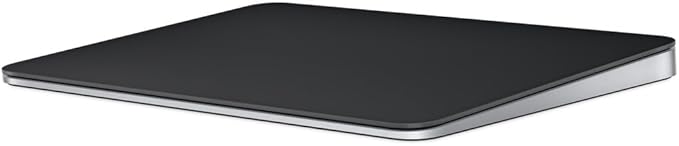
Apple Magic Trackpad - Black Multi-Touch Surface
Numéro d'article:
182358732
€ 140
Price Details
Excluding Shipping & Custom charges ( Shipping and custom charges will be calculated on checkout )
*All items will import from États-Unis
19%
En stock
 Importé depuis la boutique USA
QTY:
Il ne reste que 3 articles en stock.
Commandez maintenant et recevez votre commande aux alentours du Sunday, Août 16
Transaction sécurisée
Ubuy s'engage à protéger votre sécurité et votre confidentialité. Notre système avancé de sécurité des paiements garantit la confidentialité en chiffrant vos informations lors de la transmission grâce aux protocoles AES (Advanced Encryption Standards) et SSL (Secure Socket Layer). Vos coordonnées de paiement sont 100 % sécurisées car nous ne partageons pas vos informations de paiement avec des vendeurs tiers.
Nos meilleurs partenaires logistiques


The incredibly long-lasting internal battery will power your Magic Trackpad for about a month or more between charges.

Achetez maintenant, payez plus tard

Livraison
rapide

Retour
gratuit*

Emballage sécurisé

Produits 100 % originaux

Conformité PCI DSS

Certifié ISO 27001


Note: Step Down Voltage Transformer required for using electronics products of États-Unis store (110-120). Recommended power converters Acheter maintenant.


Ce qui se démarque
Wireless Convenience
The Apple Magic Trackpad offers seamless wireless connectivity via Bluetooth, allowing users to enjoy a clutter-free workspace without the hassle of cables.
Multi-Touch Support
Experience intuitive gestures and Multi-Touch capabilities, enabling efficient navigation and enhanced productivity on your Mac or iPad with simple swipes and taps.
Rechargeable Battery
Equipped with a rechargeable battery, the Trackpad provides extended usage on a single charge, eliminating the need for disposable batteries and promoting sustainability.
Détails du produit
- Magic Trackpad is wireless and rechargeable, and it includes the full range of Multi-Touch gestures and Force Touch technology.
- Sensors underneath the trackpad surface detect subtle differences in the amount of pressure you apply, bringing more functionality to your fingertips and enabling a deeper connection to your content.
- It features a large edge-to-edge glass surface area, making scrolling and swiping through your favourite content more productive and comfortable than ever.
- Magic Trackpad pairs automatically with your Mac, so you can get to work straightaway.
- The rechargeable battery will power it for about a month or more between charges.
| Product Dimensions (L x W x H) | 6.89 x 5.1 x 0.98 inches (17.5 x 13 x 2.5 cm) |
| Item Weight | 11.5 ounces (326.03 grams) |
| Manufacturer | Apple |
| Item model number | MXKA3AM/A |
| Batteries | 1 Lithium Ion batteries required. (included) |
| Date First Available | October 28, 2024 |
| Brand | Apple |
| Compatible Devices | Mac mini (M1, 2020), Mac mini (2018), Mac Pro (2023), Mac Pro (2019), Studio Display (2026), Studio Display XDR, Apple Vision Pro (M5), Apple Vision Pro (M2), MacBook Air (Retina, 13_inch, 2020), MacBook Pro (14-inch, M5 Pro or M5 Max), MacBook Pro (16-inch, M5 Pro or M5 Max), MacBook Pro (14-inch, M5), MacBook Pro (14_inch, 2024), MacBook Pro (16_inch, 2024), MacBook Pro (14_inch, 2023), MacBook Neo, MacBook Air (13-inch, M5), MacBook Air (15-inch, M5), MacBook Air (13_inch, M4), MacBook Air (15_inch, M4), MacBook Air (13-inch, M3), MacBook Air (15-inch, M3), MacBook Air (15-inch, M2), MacBook Air (13-inch, M2), MacBook Air (M1), MacBook Pro (16_inch, 2023), MacBook Pro (13_inch, M2, 2022), MacBook Pro (14_inch, 2021), MacBook Pro (16-inch, 2021), MacBook Pro (16-inch, 2019), MacBook Pro (13-inch, M1, 2020), MacBook Pro (13-inch, 2020), iMac (24_inch, M4, 2024), iMac (24-inch, M3, 2023), iMac (24-inch, M1, 2021), iMac (Retina 4K, 21.5_inch, 2019), iMac (Retina 5K, 27-inch, 2019–2020), iMac Pro (2017), Mac Studio (2025), Mac Studio (2023), Mac Studio (2022), Mac mini (2024), Mac mini (2023), iPad (A16), iPad (10th generation), iPad (9th generation), iPad (8th generation), iPad (7th generation), iPad (6th generation), iPad (5th generation), iPad mini (A17 Pro), iPad mini (6th generation), iPad mini (5th generation), iPad mini 4, iPad Pro 12.9-inch (1st generation), iPad Pro 11-inch (M5), iPad Pro 11-inch (M4), iPad Pro 11-inch (4th generation), iPad Pro 11-inch (3rd generation), iPad Pro 11-inch (2nd generation), iPad Pro 11-inch (1st generation), iPad Pro 10.5-inch, iPad Pro 13-inch (M5), iPad Pro 13-inch (M4), iPad Pro 12.9-inch (6th generation), iPad Pro 12.9-inch (5th generation), iPad Pro 12.9-inch (4th generation), iPad Pro 12.9-inch (3rd generation), iPad Pro 12.9-inch (2nd generation), iPad Pro 9.7-inch, iPad Air 13-inch (M4), iPad Air 11-inch (M4), iPad Air 13-inch (M3), iPad Air 11-inch (M3), iPad Air 13-inch (M2), iPad Air 11-inch (M2), iPad Air (5th generation), iPad Air (4th generation), iPad Air (3rd generation), iPad Air 2 See more |
| Connectivity Technology | Bluetooth |
| Color | Black |
| Special Feature | Lightweight, Portable, Rechargeable, Touchpad, Wireless |
What's in the box
Item
À qui est-ce destiné ?

-
Graphic Designers
The precision and multi-touch capabilities enhance their workflow and make intricate designs easier to create.
-
Frequent Mac Users
Ideal for users deeply integrated into the Apple ecosystem, enhancing productivity and comfort during extended use.
-
Minimalist Setups
Perfect for users who prefer a clean and clutter-free workspace without sacrificing functionality.

-
Gaming Enthusiasts
Not ideal for gamers needing quick responses and tactile feedback typically offered by traditional gaming mice.
DESCRIPTION DU PRODUIT
Vous avez une question ? Chattez avec nous
Questions et réponses des clients
-
question:
What are the key features of the Apple Magic Trackpad - Black Multi-Touch Surface?
répondre: The Apple Magic Trackpad is celebrated for its sleek design and innovative technology. It incorporates a large, smooth glass surface that allows for natural multi-touch gestures like swiping, pinching, and scrolling. With advanced Force Touch technology, it detects different pressure levels, enhancing user interaction. This trackpad also seamlessly connects to Mac devices via Bluetooth, making it ideal for users seeking a tidier workspace without clutter. Additionally, its spacious surface promotes precision, perfect for graphic design, video editing, or general navigation. -
question:
Is the Apple Magic Trackpad compatible with all Mac devices?
répondre: Yes, the Apple Magic Trackpad is designed to be compatible with a wide range of Mac devices, including MacBook, Mac mini, and iMac models. It connects wirelessly via Bluetooth, ensuring a stable and responsive connection. Some features, such as specific gestures, may require the latest macOS for full functionality. This makes it an excellent enhancement for both older and newer Mac users who are looking to improve their productivity and overall user experience. -
question:
How do I recharge the Apple Magic Trackpad?
répondre: The Apple Magic Trackpad features a built-in rechargeable battery, making it eco-friendly and convenient. To recharge, simply connect it to your Mac with the included USB cable, and it will charge while you use it. A full charge can last for weeks, depending on usage, so you won't have to frequently stop to recharge. This is particularly beneficial for users who require extended periods of use without interruptions, such as designers or programmers. -
question:
Can I customize the gestures on the Apple Magic Trackpad?
répondre: Yes, the Apple Magic Trackpad allows users to customize gestures through the System Preferences on macOS. You can modify existing gestures and even create new ones that suit your workflow. This flexibility enables users to tailor their interaction to fit specific applications or personal preferences, enhancing efficiency. For example, a graphic designer could set up gestures to streamline tasks in design software, making the process smoother and more intuitive. -
question:
What is the difference between the Apple Magic Trackpad and the Magic Mouse?
répondre: The primary difference lies in their form factors and functionalities. The Apple Magic Trackpad provides a larger surface area for multi-touch gestures, while the Magic Mouse features a compact design suitable for portability. The trackpad's expansive surface encourages more precise control and allows for advanced gestures, making it ideal for creative tasks. Conversely, those who prefer a more traditional mouse experience may find the Magic Mouse more comfortable. Your choice will depend on your specific needs and preferences, especially regarding the tasks you perform most frequently. -
question:
Is the Apple Magic Trackpad in black available in different countries?
répondre: Yes, the Apple Magic Trackpad - Black Multi-Touch Surface is available in various countries through authorized retailers and online platforms. Availability might differ based on local demand and stock. Checking with local vendors can provide insights into the best purchasing options within your region. It's a great idea for users looking to enhance their workstation with this sleek accessory. -
question:
What materials are used in the Apple Magic Trackpad's construction?
répondre: The Apple Magic Trackpad is constructed from high-quality materials including durable glass and aluminum. The glass surface contributes to its smooth, responsive touch-feel, while the aluminum casing provides a sturdy yet elegant design. This combination not only enhances aesthetic appeal but also ensures longevity and resilience, making it suitable for both casual and professional use. Users often appreciate the premium feel while enjoying a device that complements their Mac setup seamlessly. -
question:
How do I connect the Apple Magic Trackpad to my device?
répondre: To connect the Apple Magic Trackpad, ensure it is powered on, then navigate to the Bluetooth settings on your Mac. Once in Bluetooth preferences, you will see the trackpad listed under available devices. Click to connect, and it will pair without any hassle. This straightforward process allows for a seamless setup, enabling you to start using it instantly. It’s particularly convenient for users who frequently change devices or work in multiple locations. -
question:
Where can I buy Apple Magic Trackpad - Black Multi-Touch Surface in Belgium?
répondre: You can purchase the Apple Magic Trackpad - Black Multi-Touch Surface in Belgium from Ubuy. They offer a variety of tech products, ensuring a reliable shopping experience. Ubuy provides a user-friendly platform for browsing and comparing features, making it simple to find the right options for your needs. Whether you're enhancing your workspace at home or outfitting an office, Ubuy is a great destination for this excellent accessory. -
question:
Does the Apple Magic Trackpad support gestures for different applications?
répondre: Absolutely! The Apple Magic Trackpad supports a wide variety of gestures that can be utilized across different applications. For instance, in photo editing software, you can zoom in and rotate images with simple gestures, allowing for more creative control. Similarly, web browsing can be enhanced with swiping gestures to go back and forth between pages. This intuitive multi-touch capability is a standout feature, enabling users to navigate tasks efficiently and creatively across various platforms.
Apple MXKA3AM/A Editorial Review


The Apple Magic Trackpad has garnered a largely positive reception from users, particularly among Mac enthusiasts and professionals. It's celebrated for its seamless integration with macOS, offering a natural extension to the Apple ecosystem, which enhances user productivity and creativity. The multi-touch surface is frequently described as highly responsive, allowing for smooth navigation, app switching, and efficient multitasking—qualities that many users find indispensable for their workflow, especially in creative disciplines like music production. Many users appreciate the larger size compared to the built-in trackpads on MacBooks, providing ample space for gestures without feeling cumbersome. The trackpad's sleek white design has also been noted for its modern aesthetic, which complements other Apple devices while embodying ergonomics that reduce wrist fatigue during prolonged use. Battery life is another highlight, with reports of long-lasting performance and quick charging capabilities via USB-C. The trackpad is readily customizable, catering to individual preferences with different gesture settings, although some users have pointed out the limitations in software customization options directly available through macOS. This has led to additional reliance on third-party applications for enhanced functionality, which some Considered an inconvenience despite the hardware's impressive capabilities. Despite its premium pricing, the trackpad is generally viewed as a worthy investment given its quality, design, and effectiveness in enhancing the overall computing experience. In summary, the Apple Magic Trackpad is an excellent tool for Mac users looking for reliability, efficiency, and a high level of integration with macOS, making it a must-have for professionals and dedicated users alike. **
Avis et évaluations clients
852 évaluations des clients
-
5 étoile
86%
-
4 étoile
6%
-
3 étoile
2%
-
2 étoile
1%
-
1 étoile
5%
Donnez votre avis sur ce produit
Partagez votre avis avec d'autres clients
Avantages
- Seamless integration with macOS
- Highly responsive multi-touch surface
- Intuitive gestures for navigation and multitasking
- Larger surface area compared to built-in MacBook trackpads
- Ergonomic design that minimizes wrist fatigue
- Long battery life with quick recharge times
- Aesthetic design complements other Apple devices
- Customization options available (though limited in native software)
Les inconvénients
- Premium price point
Platform Trust & Buyer Confidence

MA
Mohammad
Verified buyer
“Excellent quality and original too,when ubuy send original things I will appreciate that ,I very satisfied thank you”
23 July 2026 · via Trustpilot
CK
Chitra
Verified buyer
“The order and delivery progress was communicated very well. Package arrived within the estimated time. Products arrived as expected in good condition.”
22-Jul-26 · via Trustpilot
K
kund
Verified buyer
“Good supply of products. Safe payment methods, and shipment worldwide! Genuine products.”
23-Jul-26 · via Trustpilot
OO
Onesi
Verified buyer
“Was my first time buying a product from Ubuy, but I found it so helpful. This is reliable. Gonna place a new order!”
22 July 2026 · via Trustpilot
SJ
SAO JOHN
Verified buyer
“Ubuy is a great online platform to buy stuff. Reliable, fast delivery time and great value for money. I've been using Ubuy online shopping platform for three years now and will continue to do so.”
23 July 2026 · via Trustpilot
Paiement sécurisé
Global Delivery
Easy Returns
Genuine Products
Historique des prix du produit
Informations importantes
- Limitations : Pour les produits expédiés à l'international, veuillez noter que toute garantie du fabricant peut ne pas être valide ; les options de service du fabricant peuvent ne pas être disponibles ; les manuels, instructions et avertissements de sécurité des produits peuvent ne pas être dans les langues du pays de destination ; les produits (et les matériaux qui les accompagnent) peuvent ne pas être conçus conformément aux normes, spécifications et exigences d'étiquetage du pays de destination ; et les produits peuvent ne pas être conformes à la tension et aux autres normes électriques du pays de destination (nécessitant l'utilisation d'un adaptateur ou d'un convertisseur le cas échéant). Il incombe au destinataire de s'assurer que le produit peut être importé légalement dans le pays de destination. En cas de commande auprès d'Ubuy ou de ses filiales, le destinataire est l'importateur officiel et doit se conformer à toutes les lois et réglementations du pays de destination.
- Tous les produits listés sur Ubuy ne sont pas à vendre, Ubuy étant un moteur de recherche mondial. Les produits sont soumis aux réglementations en matière d'exportation et de commerce.
€ 140
Commandez maintenant et recevez votre commande aux alentours du Sunday, Août 16
This item is not restrict in my country.(Please click on above link if this item is not restrict in your country, So our team will review and allow.)
QTY:
Il ne reste que 3 articles en stock.
Transaction sécurisée
PCI DSS compliant and ISO 27001:2022 certified, with encrypted payments and full buyer protection on every order.
Nos meilleurs partenaires logistiques
Livraison transfrontalière la plus rapide
Caractéristiques et avantages
- Wireless and Bluetooth connectivity provides hassle-free usage.
- Rechargeable battery eliminates the need for loose batteries.
- Multi-Touch surface enhances tracking experience with pressure sensitivity.
- Compatible with Mac or iPad, ready to use straight out of the box.
- Large edge-to-edge glass surface allows for efficient scrolling and swiping.
- Up to a month of battery life between charges for enhanced productivity.
Ubuy Assurance
Experience worry-free shopping with 100% original products, PCI DSS-compliant payment security, ISO 27001-certified data protection, the fastest cross-border delivery, free returns *, and secure packaging on every order.